
Game Module Config List
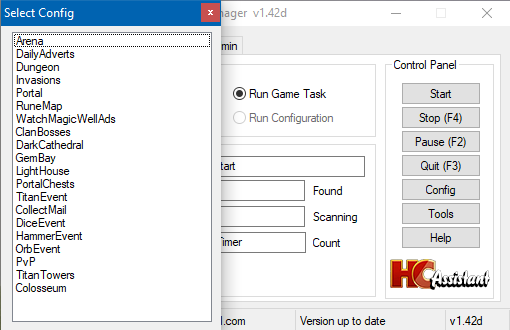
- Arena
- Daily Adverts
- Dungeon
- Invasions
- Portal
- Rune Map
- Magic Well
- Clan Bosses
- Dark Cathedral
- Gem Bay
- Lighthouse
- Portal Chests
- Titan Event (Excavation)
- Collect Mail
- Dice Event (Adventure)
- Hammer Event (Treasure Hunt)
- Orb Event (Tavern)
- PvP
- Titan Towers
- Colosseum
Arena Config Guide
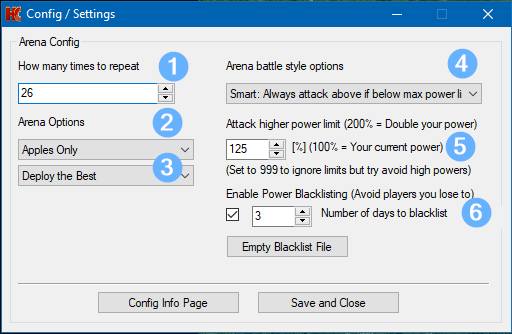
1. How many times to repeat
2. Currency (Tickets or Apples)
3. Previous Squad or Best Squad
4. Battle Options Strategy 1–5:
- Attack lowest 1st round. 2–5 rounds attack higher rank.
- Priority always given to attack lowest powers.
- If set to attack higher rank, will look for lowest powers within power threshold.
- Option for attacking all lowest powers in all rounds.
Battle Option Strategy 6: Smart Play
- Always tries to climb rank for maximum points.
- Always prefers higher‑ranked opponents.
- Only falls back to lowest power when necessary.
- Has a clear, consistent and predictable priority order.
5. Power Threshold
Determines the maximum power of opponents to attack.
999 disables limits.
100% avoids opponents above your power.
200% allows attacking opponents up to double your power.
If no opponents match the threshold, the bot attacks the closest power.
6. Blacklist Enable Option
Works only with Smart Play.
Losing to an opponent saves their power in arena_blacklist.json.
The bot avoids blacklisted opponents unless no other options exist within threshold.
Number of Days to Blacklist
Set between 1–10 days.
Blacklisted entries expire automatically.
7. “Empty Black File”
Clears the blacklist file
8. Time in Minutes to wait in queue before Arena terminates
9. Send Email notification if Arena aborts due to wait time
10. If Queue time is exceeeded, restart run instead of Abort
Dark Cathedral Config Guide
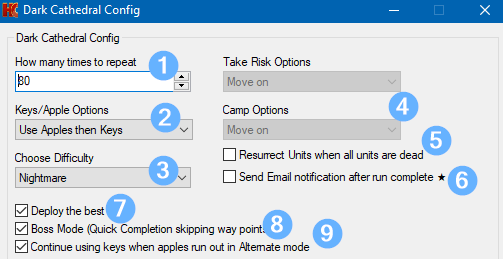
1. How many times to repeat
2. Currency (Keys or Apples)
- Use Keys
- Use Keys then Apples
- Use Apples
- Use Apples then Keys
- Alternate — Alternate Keys / Apples until repeat count limit or no keys left.
3. Choose Difficulty (Normal, Hard, Nightmare)
4. Take Risk / Camp Options (Not available)
5. Resurrect
Bot resurrects units when none are available.
Max 14 resurrections per battle to avoid infinite loops.
6. Send Email Notification (Premium Only)
Emails you when the run completes. * NOTE: This option now exists in the ‘Settings’ page.
7. Deploy Best or Previous Squad
8. Boss Mode
Targets bosses first for faster runs.
9. Continue Using Keys When Apples Run Out
Applies to Alternate mode only.
Bot continues with keys after apples run out otherwise the bot will stop
Dungeon Config Guide
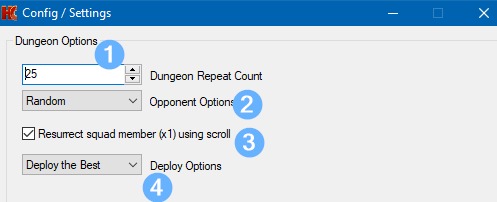
1. How many times to repeat
2. Opponent Options
- Accept Invite: Waits for partner invite. Terminates after 8 minutes if none.
- Invite Friends: Sends invites to favourite friends.
- Invite Online Friend: Invites first online favourite.
- Random: Selects a random player.
- Specific Friend: Invite a specific friend (instructions in User Guide).
- Clan: Sends invite to clan.
3. Resurrect
Resurrects one dead fighter per round using a scroll.
4. Deploy Best or Previous Squad
Dice Event / Mole-Opoly Config Guide
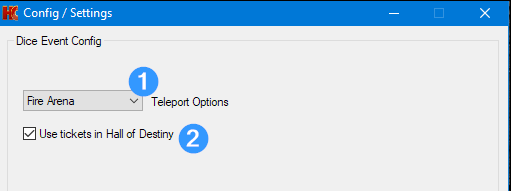
1. Teleport Options
- Fire Arena (Battle)
- Hall of Destiny (Artifact)
- Craft / Gem Workshop
2. Enable use of tickets in Hall of Destiny
Hammer / Treasure Hunt Config Guide
Selecting these options will stop the HammerEvent module after collecting resources close to your storage limit enabling you to spend the currency without waste. When you start the HammerEvent module again the resource count will be reset to 0.
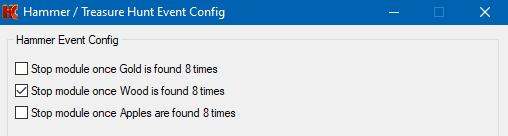
- Stop Module once Gold is found 8 times
- Stop Module once Wood is found 8 times
- Stop Module once Apples are found 8 times